
TLDR: If your merged company still runs on two sets of systems and mismatched data, this guide shows how to combine them without losing records or customers. You get a 7 step plan and a 90 day timeline. Want help? Book a free call.
Table of Contents
The deal closed on Friday. On Monday, your sales team opens one customer list while your new colleagues open another. Finance finds two invoice formats and two sets of login rules. Nobody did anything wrong. Post merger IT integration simply has not been planned yet.
Quick Answer Post merger IT integration is the work of combining two companies' systems, data and security into one setup your team can run. Start by mapping every system, decide what to keep or retire, protect access, clean the data, test small, migrate in phases and verify the numbers.
Not sure where your systems stand today? Book a free call and we will tell you honestly.
An honest note before we start. We cannot promise a timeline, a saving or a result, because every merger has different systems, people and contracts. Large or regulated deals also need your lawyers, your deal advisors and an internal IT lead. What we do is help with the data, workflow and reporting side, so your team is not stuck copying numbers between spreadsheets.
What Is Post Merger IT Integration, Really?
Post merger IT integration is the work of bringing two companies' technology into one setup your team can run every day. It starts when the deal is signed and it does not end on Day 1.
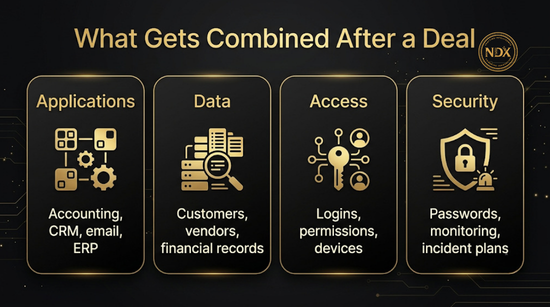
It usually covers four areas:
Applications: accounting, CRM, email and ERP (the system that runs finance, orders and inventory)
Data: customer lists, vendor records and financial history
Access: logins, permissions and devices
Security: passwords, monitoring and incident plans
It is not a single cutover weekend. It is also not always a full merge. Sometimes the smart move is to keep two systems running side by side for a few months, connect them and retire one later. The goal is simple. Your customers notice nothing, and your team stops working in two worlds.
Want to know which of these four areas is your biggest risk? Book a free call.
Why Post Merger IT Integration Matters for Your Business Now
The systems you inherit decide how fast a deal starts paying off.
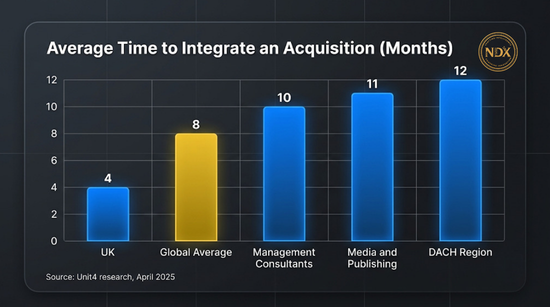
According to a Unit4 survey reported by Tech.eu (April 2025), 86 percent of 600 senior IT and finance leaders in professional services said integration takes longer than expected. The average was eight months, and one in five firms took more than a year. The UK was fastest at four months. The DACH region (Germany, Austria and Switzerland) took 12 months. Two cautions apply. The sample covers professional services only, and Unit4 sells ERP software, so treat this as one data point and not a rule for every business.
The same research named inconsistent financial data as the biggest challenge. The top causes of delay were fragmented financial systems, limited IT talent and a lack of standard processes.
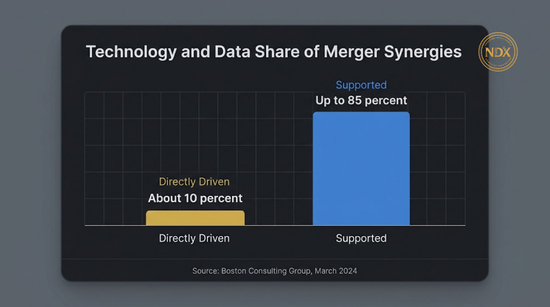
Technology also touches more of a deal than most owners expect. Boston Consulting Group (March 2024) found that in most mergers, technology and data directly drive about 10 percent of synergies and support the delivery of up to 85 percent of business synergies across cost categories. Synergies are the savings and extra revenue a deal promised. If systems do not work together, many of those promises have to wait.
Then there is risk. In a late 2019 survey of 720 M&A executives, IBM's Institute for Business Value found that more than one in three had seen data breaches that could be traced to M&A activity during integration. More than half of companies waited until due diligence was finished before assessing cybersecurity. That survey is a few years old, so read it as a signal and not a forecast. McKinsey (2020) adds that attack frequency typically rises ten to 100 times between a deal announcement and its close.
Want to see where your own merger sits on these risks? Book a free call for a plain language review.
How It Works: A Simple 5 Step Flow
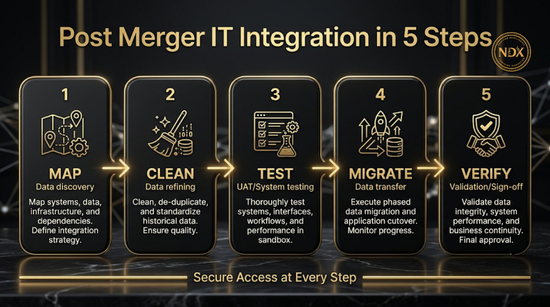
The method is five steps, with secure access running through all of them.
Map. List every system, contract and data source in both companies.
Clean. Remove duplicates and agree on one format for names, codes and dates.
Test. Move a small slice of data and check the result.
Migrate. Move the rest in phases.
Verify. Compare totals before and after, then switch off what you no longer need.
BCG describes the wider timeline in three horizons. Up to Day 100, the job is to keep the business running as before. From Day 100 through the next two to three years, the focus is merging processes and platforms. After that, the aim is bigger gains such as better reporting and automation. The five steps above mostly sit inside the first two horizons.
Want a second pair of eyes on your plan before you start? Book a free call.
Do You Actually Need Outside Help?
Not always. Many small mergers can be handled in house with a good checklist. Outside help makes sense when the data is messy, the systems are very different or your team has no spare time.
An honest reminder for beginners: if both companies are small and use the same tools, AI is not your first fix. Start with one customer list, one chart of accounts and shared logins that are set up properly. Then decide whether automation is worth it.
| Your Situation | What It Usually Means | Best First Move |
|---|---|---|
| Both companies use the same accounting and CRM tools | Mostly access and data cleanup | Handle it in house with the 7 ways below |
| Different tools, but small amounts of data | Pick one system and migrate | Follow the 7 ways and ask an advisor for a one time review |
| Different tools, duplicate records and a slow month end close | Data matching is the bottleneck | Get help with data cleanup and reporting |
| You handle health, financial or other regulated data | A compliance review is needed | Involve your lawyer and security advisor first |
| A heavy custom ERP and no internal IT lead | A specialist integrator is needed | Hire an ERP integrator. We can help with the data and reporting around it |
Not sure which row describes you? Book a free call and we will tell you honestly.
Post Merger IT Integration: 7 Ways to Do It Right
Each way below states the result you want, what the work involves and what stays with your people.
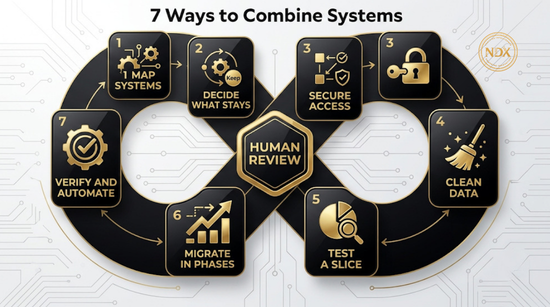
1. Map Every System, Contract and Data Source
Result: you know what you own before you change anything. List each app, who pays for it, when the contract ends, who holds the admin login and where the data lives. Include the quiet ones, such as shared spreadsheets and old email forwarding rules. We can build the inventory with you and spot overlaps quickly. What stays with your people is confirming what each system is really used for, because only your team knows which spreadsheet runs payroll.
2. Decide What Stays, Merges or Retires
Result: fewer systems and fewer surprises. Sort each application into a group such as keep, leave as is, merge into another or retire. McKinsey (2020) describes a pharmaceutical company that found nine core platform decisions covered about 70 percent of its technology synergies. By deciding those early, it shortened its integration by a full year, to 24 months. That is one company's experience, not a promise. The lesson holds anyway: decide the big systems first. McKinsey also warns that the "better" system is not always worth the cost of connecting it. What stays with your people is the final choice, because it changes daily work.
3. Lock Down Access and Security First
Result: nobody has more access than they should, and no old account stays open. Create one list of every user and every admin account in both companies. Turn on multi factor login, remove accounts for people who have left and check vendor access. Do this before any data moves. What stays with your people is approving who gets access to what and setting the security rules for the combined company.
4. Clean and Match Your Data
Result: one version of the truth for customers, vendors and financial records. Inconsistent financial data was the top challenge in the Unit4 survey, so give this step real time. Find duplicate customers, match vendor names, align your chart of accounts and agree on one format for dates and codes. AI agents can flag likely duplicates and mismatched records fast. Your team reviews and approves each rule. The next section explains how companies usually handle this work, step by step. For more on how this works, read our guide to agentic AI for data management and our guide to the intelligent data management platform.
5. Test With a Small Slice
Result: you find problems while they are still small. Pick one team, one product line or one month of data. Move it, compare the totals and fix what breaks. Repeat until the results match. This is also the time to check your reports, because a clean move can still produce a broken report. What stays with your people is deciding what counts as a pass.
6. Migrate in Phases
Result: customers and staff keep working while the move happens. Move archives and low risk data first. Move live transaction data close to cutover, which is the moment you switch to the new system. Keep backups at each step and, where you can, run old and new side by side for a short time. Plan cutover for a quiet period, such as right after month end close. What stays with your people is the go or no go call.
7. Verify the Numbers, Then Automate the Routine
Result: leaders trust the combined reports, and routine work runs without manual copying. Compare before and after totals for revenue, open invoices and customer counts. Once the numbers match, automate the repeat jobs, such as reconciliations, approval routing, customer follow up and month end reports. We build this kind of workflow automation and reporting. Our guides to modern business intelligence and compliance reporting software show where it fits. What stays with your people is signing off the numbers.
Want these seven workstreams handled for you? Book a free call.
How Companies Handle Data in a Merger
Data is where many integrations slow down, because two companies rarely describe the same customer, vendor or account in the same way. In KPMG's September 2024 technology M&A survey of 150 executives, the accuracy and completeness of financial and operational data was among the top two due diligence challenges. It was named by 25 percent of corporate respondents and 19 percent of private equity respondents. The private equity group was small (35 people), so treat that as a signal, not a rule.
The sources below describe six habits that come up again and again. They need a clear order of work and clear owners.
1. Decide who owns the truth for each type of data. Dun & Bradstreet's guidance on master data in mergers says governance should set the authoritative source for each data domain, such as customers and suppliers. It also says someone should be assigned to approve changes and resolve duplicates, so records do not fragment again after the merger. Name one owner per type of data before anything moves.
2. Standardize before you match. Look at both datasets side by side, fix formats, fill missing fields and agree on definitions. This matters more than it sounds. D&B notes that one company may treat a "customer" as a single purchasing entity while the other treats it as a whole corporate hierarchy. If you do not settle that first, your combined reports will not add up.
3. Match duplicates in layers. A practitioner playbook from ClonePartner says to start with exact matches on unique identifiers such as D-U-N-S numbers or local tax IDs, then use fuzzy matching on names, domains, phone numbers and addresses for the rest. It also says to attach the acquired company's history to the surviving record. A sensible extra step is to send uncertain matches to a person to decide, so nobody's records are merged by guesswork.
4. Keep an ID crosswalk. The same playbook recommends building external crosswalk tables. This is a simple table, kept outside the new system, that records each old ID, the new ID, the batch it moved in and its status. It lets you trace any record back to where it came from. It also recommends loading parent records before child records, for example customers before their orders.
5. Reconcile after every wave, and set the pass mark first. The playbook has teams validate record counts after each wave and, for finance, confirm that trial balances match between the old and new systems. For payroll, it says to run both systems at the same time and compare the results line by line before cutover. Our advice on top of that: agree the pass or fail rules before the move, not after, and keep the old system read only until the business signs off.
6. Treat personal data as a legal matter, not only a technical one. The UK Information Commissioner's Office (ICO) says data sharing should be part of due diligence. Before the deal, establish what data is being transferred, the purposes it was originally collected for and your lawful basis for sharing it. During the transfer, document what you do and get technical advice where different systems are involved, because of the risk of loss, corruption or degradation. Think about when and how to tell the people whose data is moving. After the change, check that records are accurate and up to date, apply one consistent retention policy and keep security in place. The ICO says this guidance is under review because of the Data (Use and Access) Act, which became law in June 2025, and rules differ by country, so confirm the current position with your lawyer.
| Data Problem After a Merger | What Companies Usually Do | What Stays With Your People |
|---|---|---|
| Same customer in two lists, spelled differently | Standardize formats, then match in layers | Approve each matching rule and review uncertain matches |
| Two meanings of "customer" or "account" | Agree one definition and link records into one hierarchy | Choose the definition the business will report on |
| Old IDs break links between records | Keep an ID crosswalk and load parent records first | Confirm the key relationships look right |
| Totals do not match after a move | Reconcile each wave against pass rules set in advance | Sign off the numbers |
| Personal data crosses between companies | Document the transfer and check purpose, lawful basis and notices | Your lawyer decides what may move and when |
One honest limit. These are common practices, not guarantees, and some of the detail comes from practitioner guides and not independent studies. Treat them as a sound starting checklist and adjust for your own systems.
Want to see how these six habits would apply to your own records? Book a free call.
What to Prepare Before the Deal Closes
The work that matters most often happens before the signature. Ask for these items early:
A system and contract inventory from the other company
Who holds admin access to each system, and whether it transfers
Known security incidents and past breaches
Which licenses move to you and which end at close
The systems that must work on Day 1, such as email, payroll, invoicing and customer support
A named owner for the integration and a short weekly check in
A list of the personal data each company holds, and the purposes it was collected for
Deals fall apart over these topics more often than you might expect. In the same IBM survey, 61 percent of respondents named compliance issues as the top reason they decided not to proceed with a deal, and 35 percent said cybersecurity risks were too great.
A legal note: what two companies may share or change before a deal closes is a legal question. Ask your lawyer before you act. This is general information, not legal advice.
Want your checklist reviewed against these points before you build? Book a free call.
How It Looks for Different Business Types
The steps stay the same. The systems that matter most change by industry.
Real estate: merge the two CRMs and lead sources so every inquiry reaches one inbox and gets one fast reply.
Home and field services (HVAC, roofing, plumbing, construction): combine scheduling, dispatch and quoting tools, and route leads from both brands into one follow up process.
Ecommerce: align product catalogs, inventory counts and order flows before you change storefronts.
Finance and bookkeeping: match charts of accounts, client files and billing rules, then check month end totals twice.
Healthcare practices: plan patient records, scheduling and privacy controls with a compliance advisor before anything moves.
Logistics: connect tracking, driver and invoicing data so customers see one set of updates.
Professional services: combine time tracking, project data and billing, since Unit4's survey found fragmented financial systems a top cause of delay.

Not sure which systems matter most in your industry? Book a free call.
Common Mistakes That Slow Integration Down
Waiting to plan security. IBM's survey found more than half of companies assess cyber risk only after due diligence ends.
Trying to keep the best of everything. McKinsey notes that picking the "best" system can cost more than upgrading the one you already have.
No clear scope. McKinsey also notes that a significant share of large IT projects double or triple their budgets and timelines without adding value. Write the scope down first.
Too few people. Unit4's respondents named limited IT talent as a top cause of delay. Name an owner and protect their time.
Skipping data cleanup. Moving messy data only gives you a bigger mess in a new system.
Moving everything at once. Phases give you room to fix problems.
Forgetting old accounts. Former staff and old vendor logins are an easy way in for attackers.
Deciding the pass mark after the move. If you do not agree what a successful test looks like beforehand, every result can be argued either way.
Want a quick check for these in your own plan? Book a free call.
Security and Compliance Basics
Treat security as the first job, not the last one. BCG reports more cyber and phishing attacks right after mergers, and McKinsey describes attackers using temporary gaps while two IT environments are being joined. Systems in transition are easier to target.
Basic steps that help:
One list of every user and admin account, reviewed weekly during the move
Multi factor login on email, finance and admin tools
Backups before every migration step
A review of vendor and partner access
A written plan for who to call if something goes wrong
A check of the other company's past incidents
A record of what personal data moved, why, and who approved it
Privacy and data protection rules differ by country and by industry, and they change. If you handle health, financial or personal data, check the current rules with a qualified advisor before you move records. This is general information, not legal advice. Our guide to compliance reporting software explains how reporting supports audit readiness.
Worried about security during your move? Book a free call and ask us directly.
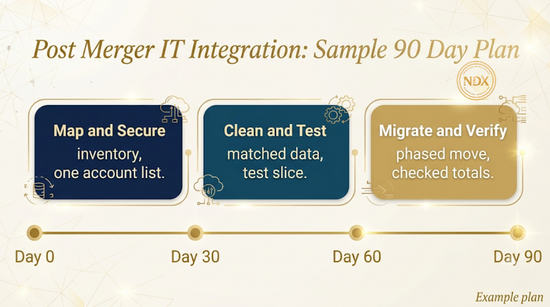
A Sample 90 Day Plan
This plan is an example. It is a starting shape, and real timelines vary. BCG describes integration running for years, so treat the first 90 days as the opening stage.
| Phase | Focus | What You Should Have at the End |
|---|---|---|
| Day 0 to 30 | Map and secure | System inventory, one account list, old access removed, Day 1 systems working |
| Day 31 to 60 | Clean and test | Matched customer and vendor data, agreed formats, an ID crosswalk, pass rules agreed, one successful test slice |
| Day 61 to 90 | Migrate and verify | Phased migration finished, totals checked, first combined reports reviewed |
Want this plan checked against your own deal? Book a free call.
An Example: Two Small Firms, One Set of Books
Picture a simple scenario to see how the steps fit together. A larger bookkeeping firm acquires a smaller one. Each uses a different accounting tool, each keeps its client list in a spreadsheet and the smaller firm shares one password sheet among the team.
Days 0 to 30: The inventory shows two accounting tools, two client lists and the shared password sheet. The firm gives everyone individual logins with multi factor sign in and removes the sheet.
Days 31 to 60: The same client appears under two names in both lists. The team agrees on one naming rule. An AI agent flags likely duplicates, and a partner approves each match. The firm keeps a crosswalk of old and new client IDs and agrees what a passing test looks like. They test the move with a small group of clients.
Days 61 to 90: After month end close, the firm migrates in phases and compares before and after totals. It sets up an automated monthly report.
In a case like this, the firm may end up with one client list and fewer manual copy steps at month end. It can take longer if records are messy or approvals are slow. Our guide to accounting software for firms covers the tools side of that choice.
Curious how this would look for your business? Book a free call and we will walk through it.
How to Choose a Provider
Pick someone who starts with questions, not tools. Use these six questions in your first call.
| Ask This | A Good Answer Sounds Like | Red Flag |
|---|---|---|
| What will you check first? | An inventory of systems, data and access | Jumping straight to a product |
| Who does the work and who approves? | A clear split, with your people approving key steps | Everything runs without your review |
| How do you handle security during the move? | Access review and backups before data moves | Security comes at the end |
| How will we know the numbers are right? | Before and after totals you can check yourself | "Trust us" |
| What happens if a test fails? | We pause, fix and test again | No fallback plan |
| What will you not do? | Limits named openly | Guaranteed savings or fixed results |
If your merger raises an ERP question, see our guide to the best ERP for a small manufacturing business. We are not an ERP vendor, so we can speak honestly about it.
Want to run these questions past us? Book a free call.
Post Merger IT Integration Providers Compared
Comparison as of November 2026. Details come from each provider's own pages.
| What We Compared | NeuroDextra | West Monroe | Jolera | Kotman Technology | NRI North America |
|---|---|---|---|---|---|
| Where they are based and how they serve you | Online only. We serve the United States, the United Kingdom, Singapore and Switzerland | Chicago based, with offices in cities such as Dallas, New York and London | Toronto headquarters, with offices in North America, Europe and Asia | Offices in Clovis, California and Kalamazoo, Michigan | Headquarters in Indianapolis, with offices across the United States |
| Merger integration page | This guide and our pilot below | Yes, a merger integration consulting page | Yes, an IT services page for mergers and acquisitions | Yes, a merger and acquisition transitional support page | An article on integrating IT after a merger, with a consultation offer |
| Data migration and cleanup | Data matching, cleanup and reporting with AI agents and workflow automation | Mentions integrating systems and data | Mentions secure data migration | Mentions system consolidation and data migration | Article covers phased data migration and data quality checks |
| Security and compliance during the move | Access review is part of our plan, and we offer audit and compliance automation | Not stated on the merger integration page | Yes, threat monitoring and compliance management | Yes, security and compliance risk review | Article covers access and security standards |
| AI and automation | Core service: AI agents and workflow automation | AI services listed in its site menu | Data and AI solutions listed | Not stated on the page read | Intelligent data and AI listed under capabilities |
| Who each describes as its client | Owners of small and mid sized businesses | Mentions middle market expertise | Mentions private equity deals | Growing companies, regulated industries and private equity firms | Organizations in manufacturing, healthcare, hospitality and other industries |
| How you start | Book a free call | Contact form | Get in touch form | Schedule an M&A technology consultation | Schedule a custom consultation |
How to read this table. West Monroe fits larger deals that need a full consulting team and an integration office. Jolera fits deals where managed IT, security monitoring and private equity experience matter most. Kotman fits businesses in California or Michigan that want a local IT team. NRI fits organizations that want a technology consultancy with offices across the United States. NeuroDextra is built for owners of small and mid sized companies who want plain language help with the data, workflow and reporting around the systems they choose, delivered online.
Want help deciding which type of provider fits your deal? Book a free call and we will tell you honestly.
Why NeuroDextra
NeuroDextra is a working partner for business owners, not a big consulting firm. We serve businesses in the United States, the United Kingdom, Singapore and Switzerland online.
Here is what we do and do not do. We build workflow automation, reporting and business intelligence, audit and compliance automation and AI agents. We are not an ERP vendor, a law firm or a deal advisor. We help with the data, workflow and reporting around the systems you choose.
Here is how we usually work with you, in five steps:
Listen. You tell us what the merger changed in your daily work.
Check feasibility honestly. We tell you what is worth doing and what is not, including when AI is not the answer.
Build small. We start with one workflow or one report.
Review with you. You check the result and decide what happens next.
Expand. We add more only after the first piece works.

Ready to talk it through with a working partner? Book a free call.
Our Data Migration Pilot for Merged Companies
If your merger left you with two sets of records and no time to sort them, our data migration pilot is a small, low risk way to start. It is built for owners of small and mid sized companies that have merged or are about to.
What the pilot includes:
A review of the data sources and systems in both companies
A data quality check that flags duplicates and mismatched records
One test slice of data moved and checked against totals
A short written summary of what we found and what to do next
Built on the practices above, the pilot also covers:
A proposed set of naming and matching rules for customers, vendors and accounts, which your team approves
A crosswalk of old and new record IDs, so every record we move can be traced back to its source
Pass or fail checks agreed with you before the test slice moves
A list of fields that hold personal data, flagged for your lawyer or advisor to review before anything goes into a live system
We flag personal data for review. Whether it may move, and under what conditions, is a legal question for your lawyer, not for us.
You keep control. Your team approves each matching rule, and nothing moves into a live system without your approval. To start, Book a free call. We will confirm fit, scope and terms with you there.
FAQs
Still have questions? Book a free call and ask us directly. Here are the most common ones first.
1. What is post merger IT integration?
It is the process of combining two companies' applications, data, access and security into one working setup after a deal closes. The goal is to keep the business running while you reduce duplicate systems.
2. How long does it take?
It depends on the deal. In the Unit4 survey of professional services firms, the average was eight months and one in five firms took more than a year. BCG describes multi year horizons for full integration. We do not promise a timeline for any project.
3. What should we do first?
Map every system, contract and account in both companies. You cannot decide what to keep, merge or retire until you know what exists.
4. Should we merge everything into one system?
Not always. Sometimes it is wiser to run two systems side by side, connect them and retire one later. McKinsey notes that the "better" system can be too costly to connect.
5. How do we protect data during integration?
Review access first, turn on multi factor login, take backups before each step and check vendor access. Do these before any data moves.
6. How do companies handle customer and vendor data in a merger?
Most follow the same order. They name an owner for each type of data, standardize formats and definitions, match duplicates in layers with a person deciding uncertain matches, keep a table linking old and new IDs, and reconcile totals after every batch before retiring the old system. Personal data needs a separate legal check on purpose, lawful basis and notices.
7. Can we move customer personal data freely after the deal?
Not automatically. The UK ICO says data sharing should be part of due diligence, including what is transferred, why it was originally collected and your lawful basis. Rules differ by country and change over time, so ask your lawyer before you move personal data.
8. Can AI help with post merger IT integration?
Yes, in specific places. AI agents can flag likely duplicate records, match vendor names, prepare reconciliation reports and route routine requests. People still decide which systems stay, approve data rules and sign off the numbers.
9. How much does it cost?
It depends on your systems, the amount of data and the scope. McKinsey notes that large IT projects often run over budget when the scope is unclear, so define the scope first. We do not publish pricing here, so book a free call for a straight answer.
10. Do we need an internal IT leader?
For larger or regulated deals, yes. Someone inside your company should own decisions about systems and access. We can support that person with data, workflow and reporting work.
11. Do you work with businesses in my area?
We serve businesses in the United States, the United Kingdom, Singapore and Switzerland online. We do not have a local office, but we work with you by video and email.
Still have questions? Book a free call and ask us directly.
Conclusion
A merger gives you more customers and more work, and it also gives you two of everything. Post merger IT integration is how you turn that into one clear setup. Map your systems, decide what stays, secure access, clean the data, test a small slice, migrate in phases and verify the numbers.
You do not need to do it all at once, and you do not have to do it alone. Start with the checklist in this guide, and bring in help where the data is messy or your team is stretched. If you want a working partner for the data, workflow and reporting side, Book a free call and we will tell you honestly what is worth doing first.
